Thursday, 17 December 2015

5 New Year’s Resolutions for Better Online Security


With the new year approaching, you are probably thinking of making some new year’s resolutions for yourself. Eat better, be more generous, spend more time with family etc… The new year is the perfect time to get a fresh start on everything from your health to your finances. At renwick, we love New Year’s resolutions and so we’ve thought of 5 good ones you should use to keep yourself protected online in 2016.


  1. new Year Resolution Safety Online Fraud Scam Security Private Investigator BarrieUse stronger passwords. As tempting as it is to use your birthday, name, or “password123” so it’s easy to remember, it is important to use strong and secure passwords. Use a unique password for each application, unrelated to your personal information. You should make it a combo of numbers, capital and lowercase letters, and symbols. You can also use a password manager if you have a hard time remembering all of these passwords!
  2. Don’t overshare. Social media is a powerful thing. With millions of people using social media every day, and 65% of the adult american population using at least one type of social media, it’s no wonder it’s a popular setting for scam artists. If you want to share a photo of your sandwich go for it! But when it comes to personally identifying information such as banking institutions, birthdays, addresses, and when you’ll be on vacation: less is more.
  3. Keep your devices secure. This means a few things. Have a lock on your mobile devices like tablets and cell phones. It is also a good idea to install a security software on your computers. Also be wary of “shoulder surfing”, which is when someone stands behind you to look at your screen for passwords or other confidential information.
  4. Keep a closer eye on your finances. The sooner your report any discrepancies in your bank account, the better. Use online banking and check back often through your transaction history and ask about any purchases or withdrawals you don’t remember making. If you wait until your statement comes in, you might be too late.
  5. Shop smarter. When shopping online, only buy from stores you are familiar with. If a deal seems too good to be true, it probably is! Don’t give away more information than needed to make a purchase.. and follow our online shopping guide:

We hope you find these resolutions useful in the New Year! Happy Holidays!

The Renwick Group has experience working with many different types of businesses and organizations providing skip-tracing, fraud investigations, WSIB support, legal team assistance, evidence gathering, employee background checks, and more. We also work with individuals who need help with personal matters. Call us at 1 (888) 722-9807 or visit our website for information

Friday, 6 November 2015

5 Tips to Safely Shop Online

Tips to staying safe while shopping online


As the holiday season approaches, you might be itching to start ( or have already started!) your gift shopping. There are many benefits to shopping online; it saves you time, money, and footwork when looking for deals. It’s very appealing to do all of your shopping from the comfort of your home and having the goods delivered right to your doorstep. The downside is that there is a risk with sharing your personal information online. Follow these 5 steps when online shopping this season to stay safe and protect yourself and your finances.
Online Shopping Safety Security


Use trusted sellers
Trust your gut when it comes to selecting where to purchase from online. Amazon, Best Buy, Walmart, Indigo etc are all very well known brands who will offer secure online shopping through their websites. If you are using a new retailer that you are unfamiliar with, research them! Look for third party reviews and ratings, google their name and see what comes up etc..


Make sure you are typing the store’s URL directly into the browser address bar rather than clicking on ads or search results- as it is very easy for fraudulent websites to trick you into thinking they are legit. If the website looks off, shady, or poorly designed- trust your instincts and go somewhere else. You might be disappointed at losing a possible deal, but it is not worth risking your personal information getting into the wrong hands.


Know the policies
Read through the website's policies including their privacy statement, billing, guarantee, and shipping policies. Familiarize yourself with how the company conducts business so there are no surprises later on.


WiFi Safety
Try to use only secure and private networks when transmitting personal or identifying information. While it is not preferable, you may use public wifi to make your purchases as long as you keep in mind a few things:

  • Try not to use a public computer to make your purchases as you have no idea what  software has been installed or who else might be connected.
  • Use only well-known public hotspots. Walmart, McDonald’s, Chapters/Indigo, and Starbucks all have secure public hotspots, and keep in mind you always use those at your own risk.
  • If you do use a public hotspot, be aware of ‘shoulder surfers’- those people who might be looking over your shoulder to read personal information off your screen.


Protect your personal information
It should go without saying that you should never give away sensitive information needlessly.  Online retailers do not need to know your SIN number or birthdate for you to make purchases. It is generally best practice to give the least amount of information possible. It is also a good idea to avoid clicking on links in emails. Phishing is a common scamming practice by which emails will look like they are coming from legitimate sources but actually are only sent to retrieve your confidential informaiton such as passwords, account numbers, ID numbers etc...


Make sure payment pages have secure connections
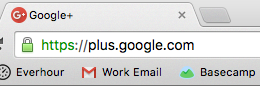
Legit websites will use a secure protocol to encrypt your information. If you look in the address bar, the URL should start with HTTPS:// and have a little icon of lock next to it. HTTP:// is NOT a secure connection. By looking for this feature, you are ensuring a secure transfer of your personal information.


Secure Shopping Online HTTPS

Even with these best practices, there will always be a risk when shopping online. However by staying vigilant and following these tips you can greatly minimize this risk and enjoy all of the perks that come with shopping online.

The Renwick Group has experience working with many different types of businesses and organizations providing skip-tracing, fraud investigations, WSIB support, legal team assistance, evidence gathering, employee background checks, and more. We also work with individuals who need help with personal matters. Call us at 1 (888) 722-9807 or visit our website for information



Thursday, 22 October 2015

How to Protect Your Organization from Social Engineering in 6 Important Steps

What is social engineering and how can it be a threat to your organization? 

Social engineering or “social hacking” as it is sometimes referred to, is a way in which people manipulate someone into revealing their confidential information such as passwords, account numbers, network access, or ID’s. As computer networks and programs improve their security, social engineering becomes more prevalent as a way to gain access to this restricted information, often shockingly easily. Rather than breaking into a computer system, they play psychological tricks 
to gain this information.

Barrie Social Engineering FraudSome common ways people use social engineering might be posing as a repairman or company representative such as a financial advisor. Recently a teen in the US gained access to the CIA Director’s email by posing as a Verizon worker.

Social hackers may use phone, the web, or even face-to-face tactics to gain information. They might call you posing as a representative from your bank claiming that your account has been flagged for suspicious activity, and demand personal information to “verify” your identity. A hacker may even pose as a collections agency demanding payments and threatening to arrest you if you don’t pay. You may receive an email claiming to be from the IT dept of your own company requiring restricted information to perform audits or system tests. Some hackers are dedicated enough to gain employment at their target in order to gather privileged information.

So how do you protect yourself from these types of psychological attacks? By following some simple guidelines you can make sure your organization does not fall victim to social hackers.

  1. Implement a policy at your organization and train all employees on proper security procedures. Empower them to take responsibility for your company's security by using critical thinking and creating a security aware culture. Require them to verify visitor IDs, and report suspicious activity.
  2. Implement proper storage and disposal of sensitive documents. Locked filing cabinets, paper shredders, and high-end network security are your best practices.
  3. Remember that it is not enough to have a strong password. Have different logins and passwords for different programs, change passwords often, and never reveal your password to anyone.
  4. Stand your ground. If you suspect someone is attempting to use these tactics on you, do not give in to intimidation.
  5. Damage control. If you suspect you may have fallen victim to a social engineering attack report the incident immediately to authorities, change all passwords, update your network software, and call your financial institutions or monitor your accounts.
  6. Hire a private investigator to complete background checks on employees as well as to help you further protect your organization from hacking and fraud.


Social engineering is a common way to gain confidential information, however you can protect yourself and your organization by staying vigilant and following the steps outlined above.

The Renwick Group has experience working with many different types of businesses and organizations providing skip-tracing, fraud investigations, WSIB support, legal team assistance, evidence gathering, employee background checks, and more. We also work with individuals who need help with personal matters. Call us at 1 (888) 722-9807 or visit our website for information.


Friday, 18 September 2015

10 Tips to Protect Yourself from Identity Theft and Fraud

identity theft renwick PI
Identity theft occurs when a person’s private identifying information is stolen for financial gain. An impostor will acquire key pieces of your personal information such as your social insurance number and drivers license … and impersonate you to commit fraud.

Here are some tips to protect yourself from identity theft:

  1. Ask questions. If someone is asking you for personal information, question them. Don’t simply answer. Your personal information is protected by Canadian legislation such a PIPEDA, so don’t give it away without questioning the reasons.
  2. Protect your pin. This seems simple, but it’s surprising how many people don’t do this! Shield the keypad every single time you enter your pin.
  3. Guard your information online. Remember to clear your logins and passwords from your computer, and change your password, at minimum, once per month. Consider paying online with credit card rather than online payment services or debit. Credit card companies usually have guarantees to protect you.
  4. Watch out for phishing scams. Be alert when you see “pop-ups” that seem like they’re from a bank. This scam will ask for your personal information which they will try to use to access your accounts.
  5. Monitor your bank and credit statements. Keep an eye out for any suspicious purchases. You can go one step further and monitor your credit report through companies such as Equifax.
  6. Shred sensitive information. Be careful with your personal information. Any piece of paper that has personal information – including your name, address, account numbers, identification numbers etc. – can be used to commit fraud. Don’t just throw it out on the street, shred the paper first. And this includes old credit and debit cards.
  7. Secure your mail. This tip goes along with number 6! Be sure to shred or destroy all documents containing personal information. Especially that pre-approved credit card application that is mailed out.
  8. Don’t give out your social insurance number. There are very few organizations that should ask for this information. More importantly, only give this information to organizations YOU have initiated contact with (like banks, employers and government.)
  9. Only enter payments on secured sites. Look for the “paddock” symbol and sites that begin with “https.”
  10. Use complicated passwords. There’s a reason why you can’t choose “1234” for pin codes. Unique complicated passwords will give you an extra layer of protection. Try to stay away from passwords that can be easily guessed (like your birthday or child’s name).


The Renwick Group has experience working with many different types of businesses and organizations providing skip-tracing, fraud investigations, WSIB support, legal team assistance, evidence gathering, employee background checks, and more. We also work with individuals who need help with personal matters. Call us at 1 (888) 722-9807 or visit our website for information.